
Koala Sampler • Beat Maker2.0.21 - App Store
Sie können Ergebnisse sehen in einige Sekunden.
Herausgeberbeschreibung
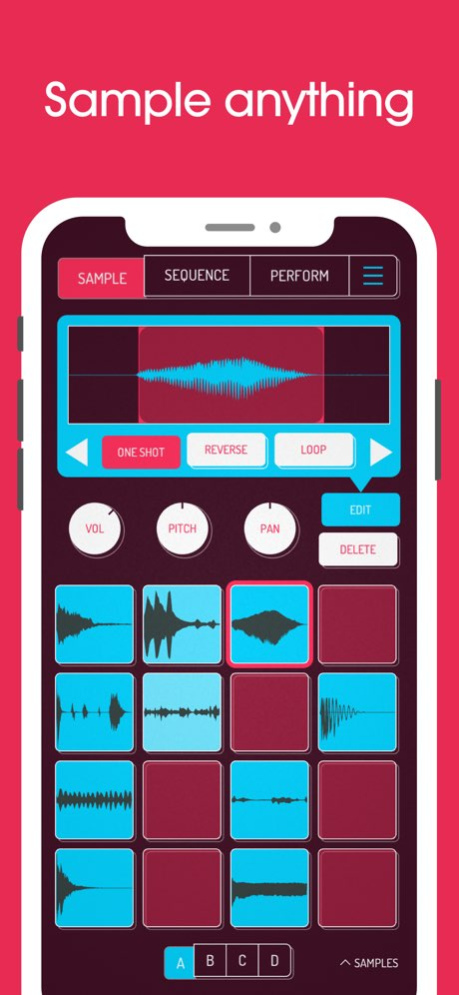


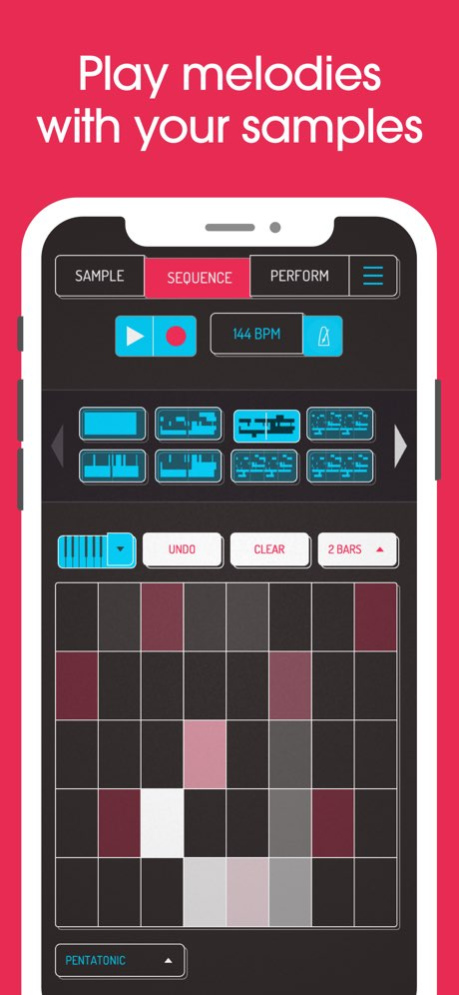
Koala ist der ultimative Sampler im Taschenformat. Nimm alles mit dem Mikrofon deines Handys auf oder lade deine eigenen Sounds. Mach mit deinen Samples Beats, füge Effekte hinzu und bau daraus einen Track!
Koalas superintuitive Oberfläche bringt dich blitzschnell zum fertigen Track - hier gibt es kein Bremspedal. Du kannst den Output der App auch durch die Effekte zurück in den Input resampeln, die klanglichen Möglichkeiten sind also endlos.
Koalas Design ist voll darauf ausgelegt, Musikmachen sofort möglich zu machen: Du bleibst im Flow, es bleibt spaßig, und du verlierst dich nicht in endlosen Parameterseiten und Mikro-Editing.
"Been putting that $4 koala sampler to good use lately. Undeniably great tool that puts some of these expensive beat boxes to shame. A must cop."
-- flying lotus, twitter
* Nimm bis zu 64 verschiedene Samples mit deinem Mikrofon auf
* Verwandle deine Stimme oder jeden anderen Sound mit 16 erstklassigen Effekten
* Lade deine eigenen Samples
* Wähle aus 250 mitgelieferten Sounds
* Resample den Output der App als neues Sample
* Exportiere Loops oder ganze Tracks als WAV-Dateien in Profi-Qualität
* Direkter Export als Ableton Live Set
* Kopiere, füge ein oder verschmelze Sequenzen einfach per Drag & Drop
* Baue Beats mit dem hochauflösenden Sequencer
* Importiere Samples aus der Dateien-App oder sogar aus Videos
* Im Keyboard-Modus spielst du chromatisch oder in einer von 9 Skalen
* Quantisierung und Swing für das richtige Feeling
* Normal/One-Shot/Loop/Reverse-Wiedergabe pro Sample
* 6 Choke-Gruppen
* Attack, Release und Tone pro Sample einstellbar
* Mute/Solo und Note Repeat
* Lege beliebige (oder alle) der 16 Effekte auf den gesamten Mix
* AUv3-kompatibel - nutze Koala in GarageBand, Logic, Cubasis usw.
* MIDI-steuerbar - spiele deine Samples auf einem Keyboard, mappe die Effekte auf Regler
* Jamme mit anderen über WLAN mit Ableton Link
* Gratis-Exemplar von Ableton Live Lite inklusive
* AudioShare-kompatibel
* Trenne Samples per KI in einzelne Instrumente (Drums, Bass, Vocals und mehr)
* Wähle dein eigenes Hintergrundbild und einen von immer mehr visuellen Hintergrund-Effekten
8 integrierte Mikrofon-Effekte:
* More Bass
* More Treble
* Fuzz
* Robot
* Reverb
* Octave up
* Octave down
* Synthesizer
16 integrierte DJ-Mix-Effekte:
* Bit-crusher
* Pitch-shift
* Comb filter
* Ring modulator
* Reverb
* Stutter
* Gate
* Resonant High/Low Pass Filters
* Cutter
* Reverse
* Dub
* Tempo Delay
* Talkbox
* VibroFlange
* Dirty
* Compressor
Im SAMURAI In-App-Kauf enthalten:
* Timestretch in Profi-Qualität (5 Modi: Modern, Retro, Beats, Re-pitch und Cyclic)
* Piano-Roll-Editor
* Auto-Chop (auto, equal und lazy)
* 3-Band-EQ
* Sync-Out für Pocket Operator
* Quokka Synth - polyphoner Power-Synthesizer
* MIDI Out - steuere externe MIDI-Hardware mit Koalas Sequencer
* Chopper - Sample-Chopping-Instrument mit mehreren Modi
Im MIXER In-App-Kauf enthalten:
* Mixe deine Beats professionell mit 4-Kanal-Mixer + Main-Bus
* Route jedes Sample auf jeden beliebigen Kanal
* Mute/Solo, Fader und präzises Metering auf jedem Kanal
* 5 Effekt-Slots pro Kanal
* 29 hochwertige Effekte - Kompressoren, Filter, Phaser und mehr, weitere folgen
* Hoste AUv3-Plugins - Audioeffekte und Instrumente
Über Koala Sampler • Beat Maker
Das Unternehmen, das Koala Sampler • Beat Maker entwickelt, ist Mazbox Limited. Die neueste vom Entwickler veröffentlichte Version ist 2.0.21.
Um Koala Sampler • Beat Maker auf Ihrem iOS-Gerät zu installieren, klicken Sie einfach auf die grüne Schaltfläche Weiter zur App oben, um den Installationsvorgang zu starten. Die App ist seit 2026-11-04 auf unserer Website gelistet und wurde 0 Mal heruntergeladen. Wir haben bereits geprüft, ob der Download-Link sicher ist; zu Ihrem eigenen Schutz empfehlen wir jedoch, die heruntergeladene App mit Ihrem Antivirusprogramm zu scannen. Ihr Antivirusprogramm kann Koala Sampler • Beat Maker als Malware erkennen, wenn der Download-Link defekt ist.
So installieren Sie Koala Sampler • Beat Maker auf Ihrem iOS-Gerät:
- Klicken Sie auf unserer Website auf die Schaltfläche Weiter zur App. Dadurch werden Sie zum App Store weitergeleitet.
- Sobald Koala Sampler • Beat Maker im iTunes-Eintrag Ihres iOS-Geräts angezeigt wird, können Sie den Download und die Installation starten. Tippen Sie rechts neben der App auf die Schaltfläche LADEN, um den Download zu starten.
- Wenn Sie nicht in der iOS App Store App angemeldet sind, werden Sie nach Ihrer Apple-ID und/oder Ihrem Passwort gefragt.
- Nachdem Koala Sampler • Beat Maker heruntergeladen wurde, sehen Sie rechts einen INSTALLIEREN-Button. Tippen Sie darauf, um die eigentliche Installation der iOS-App zu starten.
- Sobald die Installation abgeschlossen ist, können Sie auf die Schaltfläche ÖFFNEN tippen, um sie zu starten. Das Symbol wird außerdem zum Startbildschirm Ihres Geräts hinzugefügt.
Programmdetails
Systemanforderungen
Download-Informationen
Preisgestaltung
Versionsgeschichte
Version 2.0.21
veröffentlicht am 2026-11-04
- MIDI-Mapping für viel mehr Dinge, z. B. Quokka und Bus-Effekte
- System-Audio als Eingangsquelle aufnehmen (nur iOS 27+)
- Relative MIDI-CC-Regler (Endlos-Encoder)
- (Samurai) DECAY-Regler für den Chopper
- Quality-Regler: Samplerate und Interpolation pro Sample ändern
- Genauerer Autochop
- Optimiertes Timestretch, braucht weniger CPU
- Besserer MIDI-Sync
Version 2.0.15
veröffentlicht am 2026-10-16
- Automation für Bus-Effekte, Mixer-Kanäle sowie Plug-in-Synths und -Effekte
- Neue Option „Same pad mapping for all banks" in den MIDI-Einstellungen: Mappe die 16 Pads einmal, und die ausgewählte Bank entscheidet, welche Pads deine Noten spielen. Der Bank-Wahlschalter lässt sich ebenfalls per MIDI mappen. Schaltest du die Option aus, behält jedes der 64 Pads sein eigenes Mapping, wie bisher
- Der MIDI-Map-Modus lässt sich jetzt über die QWERTY-Tastatur (Standardtaste `;`) oder einen gemappten MIDI-Controller ein- und ausschalten
- Unterstützung für das iPhone Duo
- Looper-Aufnahmen (auf einem Pad nach unten wischen) starten und stoppen jetzt sauber auf der Taktgrenze, auch wenn du kurz nach dem Taktanfang stoppst
- Das Pad-zu-MIDI-Noten-Mapping ist jetzt ein festes 4x4-Layout, unabhängig von der Fensterform: Eine Sequenz, die mit geöffnetem AUv3 im Hochformat aufgenommen wurde, spielt nach dem Schließen des Fensters auf den richtigen Pads ab
- Fix: Das Grid-Keyboard blieb nach einem Skalenwechsel nahe dem Ende des Tonumfangs hängen
- Beim Anhängen von Sequenzen (Append) wird jetzt auch ihre Parameter-Automation mitkopiert
Version 2.0.12
veröffentlicht am 2026-10-15
Version History For Samurai: Pitch bend! (and also automation of PERFORM effects) 2.0.12 Sep 30 - New HI-QUALITY stem splitter - now optimized for older phones
- lots of small bug fixes and enhancements 2.0.11 Sep 25 - New HI-QUALITY stem splitter
- lots of small bug fixes and enhancements 2.0.10 Sep 24 - Global undo/redo
- Arpeggiator
- Chopper gets a NEXT trigger mode - play your chops one after another
- New export options - control exactly how your loops and tracks are exported
- Piano roll notes now match your pad colours
- Lots of bug fixes 2.0.3 Aug 21 - New sample pack: Ese-O's - with Deckard turntable scratching toy (with spectral scratching(!))
- MIDI CC pickup mode - knobs no longer jump when a hardware controller position doesn't match
- Apple Audio Units can now be hidden from the effects list
- New "use waveform handles" setting for more precise editing of sample start/end points
- Higher quality sample import (new resampling engine)
- Audio exports now use dithering for cleaner-sounding 16-bit WAV files
- New setting in Extras to show the iOS status bar
- Stutter and reverse delay now always snap to sync, and stutter stays in time when changing position
- Reduced CPU usage of perform effects, and when the app is idle
- Toys keep playing when rotating the device or resizing the window
- Fixed missing Pocket Operator sync option in audio settings
- Nicer-looking bus effect chooser 2.0.2 Jul 31 - plate reverb bus effect
- pull down in the load screen to search songs
- made left right fine-tuning on knobs less jumpy with really slow movements.
- Fixed EQ bus-effect band types not surviving save/load
- lots and lots of performance enhancements and bug fixes. thx so much to the beta team!! 2.0.0 Jul 9 - support for AUv3 plugins with mixer add-on
- isolator bus effect for users with mixer add-on 1.4162 May 19 bug fixes and performance optimisation 1.4157 Apr 1 - new "SOLAR STUDIES" sample pack by LONDON RAIN
- fix for Delay in the Mixer
- new fourths layout for the grid
- auto chop fix 1.4156 Mar 20 new "SOLAR STUDIES" sample pack by LONDON RAIN 1.4155 Mar 18 - Fixed stem splitting to use less memory to prevent crashes on older devices
- Fixed problem with time stretcher 1.4152 Feb 26 - fix for tools menu being hidden under dynamic island/camera etc.
- fix bug where Perform FX weren't being saved
- fix crash when mapping midi controllers to Perform FX
- Fix issue with AUV3 not saving/loading properly 1.4151 Feb 24 - fixed small timestretch bug which caused crash on start
- made it warn user on song swipe delete with option to not ask again
- scale now saves with song, so it will be remembered when you load the song again
- qwerty shortcut editor
- lots of small improvements and bug fixes 1.4150 Feb 21 - Fixed problem with loading samples from sample pack kits or other songs
- Copied Choppers will now play back and let you change the chop amount 1.4147 Jan 14 - Labels now appear on Chopper pads
- Fixes Chopper occassionally crashing when normalizing
- Fixes slices not appearing in chopper after normalizing
- Extracting a pattern from chopper will no longer clear the existing pattern 1.4146 Jan 9 - new CHOPPER instrument for samurai version. Non-destructively chop your samples!
- lots of bug fixes and improvements
- fixed bug with Quokka 1.4145 12/18/2025 - new CHOPPER instrument for samurai version. Non-destructively chop your samples!
- lots of bug fixes and improvements 1.4144 12/17/2025 - Added switch to enable auto-normalize on recording
- Fixed quokka preset system issues
- Fixed issue where mute and solo would not be reloaded by the midi map
- Fixed issue with quantize settings
- lots of small fixes and bugfixes 1.4137 11/18/2025 - Added switch to enable auto-normalize on recording
- Fixed quokka preset system issues
- Fixed issue where mute and solo would not be reloaded by the midi map
- Fixed issue with quantize settings
- lots of small fixes and bugfixes 1.4136 11/18/2025 - fixes for autosave 1.4135 10/08/2025 - made mixer delay effect not fade out if the filter is fully open
- fix bug with AUTO-PLAY not advancing when there are identical sequences
- fix bug with auto trim in auv3 version
- fixed bug where attack, release, tone and reverse controls were not resetting after bouncing a sample
- fixed a bug where koala could crash if the numpad was dismissed very quickly 1.4134 10/03/2025 - you can now lazy chop - start one pad recording, then press another pad to continue the recording on that pad
- fixed bug where app could crash when closing AutoChop
- fixed bug where sometimes loop options were not showing correct values
- piano roll notes that are set to 0% velocity now are completely silent
- fix not being able to save pad color if its green 1.4132 09/24/2025 - Added Envelope Follower to Filter effect
- made dub siren louder
- Added "RESTORE PURCHASES" button to settings page and sample pack store
- Quokka would have hanging notes when using the preview column
- Drive Effect mix will maintain a constant perceptual gain
- LFO sync will remain locked to the pattern phase if sync'd
- Koala will reload a session as an auv3 when the editor isnt open
- Auv3 can access icloud files through the browser
- Time legend in the piano roll will no longer go missing
- Fix live quantize bug
- Added ability to save a template project
- Midi events in AUv3 will be honoured even if the ui isn't open
- Drive and Clipper can now be oversampled
- Note repeater will correctly release all notes
- Fix crash when loading a very old project
- Tap a knob to launch a numpad to for accurate value entry 1.4128 08/07/2025 Need more samples? New sample pack store with 3 sample packs already available - each one comes with several sample kits and a free synthesizer toy.
Also,
- added restore purchases button
- fixes bug with Holly
- fixes cirrus cuts sample pack
- made dub siren louder 1.4120 05/07/2025 Need more samples? New sample pack store with 3 sample packs already available - each one comes with several sample kits and a free synthesizer toy. 1.4108 05/01/2025
Version 2.0.12
veröffentlicht am 2026-10-01
Version History For Samurai: Pitch bend! (and also automation of PERFORM effects) 2.0.12 1d ago - New HI-QUALITY stem splitter - now optimized for older phones
- lots of small bug fixes and enhancements 2.0.11 5d ago - New HI-QUALITY stem splitter
- lots of small bug fixes and enhancements 2.0.10 Sep 24 - Global undo/redo
- Arpeggiator
- Chopper gets a NEXT trigger mode - play your chops one after another
- New export options - control exactly how your loops and tracks are exported
- Piano roll notes now match your pad colours
- Lots of bug fixes 2.0.3 Aug 21 - New sample pack: Ese-O's - with Deckard turntable scratching toy (with spectral scratching(!))
- MIDI CC pickup mode - knobs no longer jump when a hardware controller position doesn't match
- Apple Audio Units can now be hidden from the effects list
- New "use waveform handles" setting for more precise editing of sample start/end points
- Higher quality sample import (new resampling engine)
- Audio exports now use dithering for cleaner-sounding 16-bit WAV files
- New setting in Extras to show the iOS status bar
- Stutter and reverse delay now always snap to sync, and stutter stays in time when changing position
- Reduced CPU usage of perform effects, and when the app is idle
- Toys keep playing when rotating the device or resizing the window
- Fixed missing Pocket Operator sync option in audio settings
- Nicer-looking bus effect chooser 2.0.2 Jul 31 - plate reverb bus effect
- pull down in the load screen to search songs
- made left right fine-tuning on knobs less jumpy with really slow movements.
- Fixed EQ bus-effect band types not surviving save/load
- lots and lots of performance enhancements and bug fixes. thx so much to the beta team!! 2.0.0 Jul 9 - support for AUv3 plugins with mixer add-on
- isolator bus effect for users with mixer add-on 1.4162 May 19 bug fixes and performance optimisation 1.4157 Apr 1 - new "SOLAR STUDIES" sample pack by LONDON RAIN
- fix for Delay in the Mixer
- new fourths layout for the grid
- auto chop fix 1.4156 Mar 20 new "SOLAR STUDIES" sample pack by LONDON RAIN 1.4155 Mar 18 - Fixed stem splitting to use less memory to prevent crashes on older devices
- Fixed problem with time stretcher 1.4152 Feb 26 - fix for tools menu being hidden under dynamic island/camera etc.
- fix bug where Perform FX weren't being saved
- fix crash when mapping midi controllers to Perform FX
- Fix issue with AUV3 not saving/loading properly 1.4151 Feb 24 - fixed small timestretch bug which caused crash on start
- made it warn user on song swipe delete with option to not ask again
- scale now saves with song, so it will be remembered when you load the song again
- qwerty shortcut editor
- lots of small improvements and bug fixes 1.4150 Feb 21 - Fixed problem with loading samples from sample pack kits or other songs
- Copied Choppers will now play back and let you change the chop amount 1.4147 Jan 14 - Labels now appear on Chopper pads
- Fixes Chopper occassionally crashing when normalizing
- Fixes slices not appearing in chopper after normalizing
- Extracting a pattern from chopper will no longer clear the existing pattern 1.4146 Jan 9 - new CHOPPER instrument for samurai version. Non-destructively chop your samples!
- lots of bug fixes and improvements
- fixed bug with Quokka 1.4145 12/18/2025 - new CHOPPER instrument for samurai version. Non-destructively chop your samples!
- lots of bug fixes and improvements 1.4144 12/17/2025 - Added switch to enable auto-normalize on recording
- Fixed quokka preset system issues
- Fixed issue where mute and solo would not be reloaded by the midi map
- Fixed issue with quantize settings
- lots of small fixes and bugfixes 1.4137 11/18/2025 - Added switch to enable auto-normalize on recording
- Fixed quokka preset system issues
- Fixed issue where mute and solo would not be reloaded by the midi map
- Fixed issue with quantize settings
- lots of small fixes and bugfixes 1.4136 11/18/2025 - fixes for autosave 1.4135 10/08/2025 - made mixer delay effect not fade out if the filter is fully open
- fix bug with AUTO-PLAY not advancing when there are identical sequences
- fix bug with auto trim in auv3 version
- fixed bug where attack, release, tone and reverse controls were not resetting after bouncing a sample
- fixed a bug where koala could crash if the numpad was dismissed very quickly 1.4134 10/03/2025 - you can now lazy chop - start one pad recording, then press another pad to continue the recording on that pad
- fixed bug where app could crash when closing AutoChop
- fixed bug where sometimes loop options were not showing correct values
- piano roll notes that are set to 0% velocity now are completely silent
- fix not being able to save pad color if its green 1.4132 09/24/2025 - Added Envelope Follower to Filter effect
- made dub siren louder
- Added "RESTORE PURCHASES" button to settings page and sample pack store
- Quokka would have hanging notes when using the preview column
- Drive Effect mix will maintain a constant perceptual gain
- LFO sync will remain locked to the pattern phase if sync'd
- Koala will reload a session as an auv3 when the editor isnt open
- Auv3 can access icloud files through the browser
- Time legend in the piano roll will no longer go missing
- Fix live quantize bug
- Added ability to save a template project
- Midi events in AUv3 will be honoured even if the ui isn't open
- Drive and Clipper can now be oversampled
- Note repeater will correctly release all notes
- Fix crash when loading a very old project
- Tap a knob to launch a numpad to for accurate value entry 1.4128 08/07/2025 Need more samples? New sample pack store with 3 sample packs already available - each one comes with several sample kits and a free synthesizer toy.
Also,
- added restore purchases button
- fixes bug with Holly
- fixes cirrus cuts sample pack
- made dub siren louder 1.4120 05/07/2025 Need more samples? New sample pack store with 3 sample packs already available - each one comes with several sample kits and a free synthesizer toy. 1.4108 05/01/2025
Version 2.0.3
veröffentlicht am 2026-09-24
Version History - Global undo/redo
- Arpeggiator
- Chopper gets a NEXT trigger mode - play your chops one after another
- New export options - control exactly how your loops and tracks are exported
- Piano roll notes now match your pad colours
- Lots of bug fixes 2.0.3 Aug 21 - New sample pack: Ese-O's - with Deckard turntable scratching toy (with spectral scratching(!))
- MIDI CC pickup mode - knobs no longer jump when a hardware controller position doesn't match
- Apple Audio Units can now be hidden from the effects list
- New "use waveform handles" setting for more precise editing of sample start/end points
- Higher quality sample import (new resampling engine)
- Audio exports now use dithering for cleaner-sounding 16-bit WAV files
- New setting in Extras to show the iOS status bar
- Stutter and reverse delay now always snap to sync, and stutter stays in time when changing position
- Reduced CPU usage of perform effects, and when the app is idle
- Toys keep playing when rotating the device or resizing the window
- Fixed missing Pocket Operator sync option in audio settings
- Nicer-looking bus effect chooser 2.0.2 Jul 31 - plate reverb bus effect
- pull down in the load screen to search songs
- made left right fine-tuning on knobs less jumpy with really slow movements.
- Fixed EQ bus-effect band types not surviving save/load
- lots and lots of performance enhancements and bug fixes. thx so much to the beta team!! 2.0.0 Jul 9 - support for AUv3 plugins with mixer add-on
- isolator bus effect for users with mixer add-on 1.4162 May 19 bug fixes and performance optimisation 1.4157 Apr 1 - new "SOLAR STUDIES" sample pack by LONDON RAIN
- fix for Delay in the Mixer
- new fourths layout for the grid
- auto chop fix 1.4156 Mar 20 new "SOLAR STUDIES" sample pack by LONDON RAIN 1.4155 Mar 18 - Fixed stem splitting to use less memory to prevent crashes on older devices
- Fixed problem with time stretcher 1.4152 Feb 26 - fix for tools menu being hidden under dynamic island/camera etc.
- fix bug where Perform FX weren't being saved
- fix crash when mapping midi controllers to Perform FX
- Fix issue with AUV3 not saving/loading properly 1.4151 Feb 24 - fixed small timestretch bug which caused crash on start
- made it warn user on song swipe delete with option to not ask again
- scale now saves with song, so it will be remembered when you load the song again
- qwerty shortcut editor
- lots of small improvements and bug fixes 1.4150 Feb 21 - Fixed problem with loading samples from sample pack kits or other songs
- Copied Choppers will now play back and let you change the chop amount 1.4147 Jan 14 - Labels now appear on Chopper pads
- Fixes Chopper occassionally crashing when normalizing
- Fixes slices not appearing in chopper after normalizing
- Extracting a pattern from chopper will no longer clear the existing pattern 1.4146 Jan 9 - new CHOPPER instrument for samurai version. Non-destructively chop your samples!
- lots of bug fixes and improvements
- fixed bug with Quokka 1.4145 12/18/2025 - new CHOPPER instrument for samurai version. Non-destructively chop your samples!
- lots of bug fixes and improvements 1.4144 12/17/2025 - Added switch to enable auto-normalize on recording
- Fixed quokka preset system issues
- Fixed issue where mute and solo would not be reloaded by the midi map
- Fixed issue with quantize settings
- lots of small fixes and bugfixes 1.4137 11/18/2025 - Added switch to enable auto-normalize on recording
- Fixed quokka preset system issues
- Fixed issue where mute and solo would not be reloaded by the midi map
- Fixed issue with quantize settings
- lots of small fixes and bugfixes 1.4136 11/18/2025 - fixes for autosave 1.4135 10/08/2025 - made mixer delay effect not fade out if the filter is fully open
- fix bug with AUTO-PLAY not advancing when there are identical sequences
- fix bug with auto trim in auv3 version
- fixed bug where attack, release, tone and reverse controls were not resetting after bouncing a sample
- fixed a bug where koala could crash if the numpad was dismissed very quickly 1.4134 10/03/2025 - you can now lazy chop - start one pad recording, then press another pad to continue the recording on that pad
- fixed bug where app could crash when closing AutoChop
- fixed bug where sometimes loop options were not showing correct values
- piano roll notes that are set to 0% velocity now are completely silent
- fix not being able to save pad color if its green 1.4132 09/24/2025 - Added Envelope Follower to Filter effect
- made dub siren louder
- Added "RESTORE PURCHASES" button to settings page and sample pack store
- Quokka would have hanging notes when using the preview column
- Drive Effect mix will maintain a constant perceptual gain
- LFO sync will remain locked to the pattern phase if sync'd
- Koala will reload a session as an auv3 when the editor isnt open
- Auv3 can access icloud files through the browser
- Time legend in the piano roll will no longer go missing
- Fix live quantize bug
- Added ability to save a template project
- Midi events in AUv3 will be honoured even if the ui isn't open
- Drive and Clipper can now be oversampled
- Note repeater will correctly release all notes
- Fix crash when loading a very old project
- Tap a knob to launch a numpad to for accurate value entry 1.4128 08/07/2025 Need more samples? New sample pack store with 3 sample packs already available - each one comes with several sample kits and a free synthesizer toy.
Also,
- added restore purchases button
- fixes bug with Holly
- fixes cirrus cuts sample pack
- made dub siren louder 1.4120 05/07/2025 Need more samples? New sample pack store with 3 sample packs already available - each one comes with several sample kits and a free synthesizer toy. 1.4108 05/01/2025 - Can now export multiple selected samples, not just a single sample or all samples
- Vocoder effect is back (less Festive)
- Added natural minor scale
- now you can change sample pad colors
- Fixed bug where m4a's and AIF files with 2 f's in the extension 1.4107 04/30/2025 - New effect: Clipper
- Can now change keyboard grid size
- Quokka will now let you import and export presets
- Fixed ADD LOCATION on iOS16
- Fixed import video crash on iOS 17
- Pitch shifter effect is now more efficient
- MIDI input whilst in keyboard mode can now snap to current scale (can switch off in settings)
- lots of other bug fixes and improvements 1.4103 03/25/2025 - You can now tap on the tooltip above a knob to enter the value exactly
- fixed crash if you try to export all samples (edited) and there's a quokka instance.
- Add location button is now hidden below iOS 14
- fixed problem adding custom sample folder locations for iOS 14-15 1.4101 01/08/2025
Version 2.0.2
veröffentlicht am 2026-08-21
Version History - New sample pack: Ese-O's - with Deckard turntable scratching toy (with spectral scratching(!))
- MIDI CC pickup mode - knobs no longer jump when a hardware controller position doesn't match
- Apple Audio Units can now be hidden from the effects list
- New "use waveform handles" setting for more precise editing of sample start/end points
- Higher quality sample import (new resampling engine)
- Audio exports now use dithering for cleaner-sounding 16-bit WAV files
- New setting in Extras to show the iOS status bar
- Stutter and reverse delay now always snap to sync, and stutter stays in time when changing position
- Reduced CPU usage of perform effects, and when the app is idle
- Toys keep playing when rotating the device or resizing the window
- Fixed missing Pocket Operator sync option in audio settings
- Nicer-looking bus effect chooser 2.0.2 Jul 31 - plate reverb bus effect
- pull down in the load screen to search songs
- made left right fine-tuning on knobs less jumpy with really slow movements.
- Fixed EQ bus-effect band types not surviving save/load
- lots and lots of performance enhancements and bug fixes. thx so much to the beta team!! 2.0.0 Jul 9 - support for AUv3 plugins with mixer add-on
- isolator bus effect for users with mixer add-on 1.4162 May 19 bug fixes and performance optimisation 1.4157 Apr 1 - new "SOLAR STUDIES" sample pack by LONDON RAIN
- fix for Delay in the Mixer
- new fourths layout for the grid
- auto chop fix 1.4156 Mar 20 new "SOLAR STUDIES" sample pack by LONDON RAIN 1.4155 Mar 18 - Fixed stem splitting to use less memory to prevent crashes on older devices
- Fixed problem with time stretcher 1.4152 Feb 26 - fix for tools menu being hidden under dynamic island/camera etc.
- fix bug where Perform FX weren't being saved
- fix crash when mapping midi controllers to Perform FX
- Fix issue with AUV3 not saving/loading properly 1.4151 Feb 24 - fixed small timestretch bug which caused crash on start
- made it warn user on song swipe delete with option to not ask again
- scale now saves with song, so it will be remembered when you load the song again
- qwerty shortcut editor
- lots of small improvements and bug fixes 1.4150 Feb 21 - Fixed problem with loading samples from sample pack kits or other songs
- Copied Choppers will now play back and let you change the chop amount 1.4147 Jan 14 - Labels now appear on Chopper pads
- Fixes Chopper occassionally crashing when normalizing
- Fixes slices not appearing in chopper after normalizing
- Extracting a pattern from chopper will no longer clear the existing pattern 1.4146 Jan 9 - new CHOPPER instrument for samurai version. Non-destructively chop your samples!
- lots of bug fixes and improvements
- fixed bug with Quokka 1.4145 12/18/2025 - new CHOPPER instrument for samurai version. Non-destructively chop your samples!
- lots of bug fixes and improvements 1.4144 12/17/2025 - Added switch to enable auto-normalize on recording
- Fixed quokka preset system issues
- Fixed issue where mute and solo would not be reloaded by the midi map
- Fixed issue with quantize settings
- lots of small fixes and bugfixes 1.4137 11/18/2025 - Added switch to enable auto-normalize on recording
- Fixed quokka preset system issues
- Fixed issue where mute and solo would not be reloaded by the midi map
- Fixed issue with quantize settings
- lots of small fixes and bugfixes 1.4136 11/18/2025 - fixes for autosave 1.4135 10/08/2025 - made mixer delay effect not fade out if the filter is fully open
- fix bug with AUTO-PLAY not advancing when there are identical sequences
- fix bug with auto trim in auv3 version
- fixed bug where attack, release, tone and reverse controls were not resetting after bouncing a sample
- fixed a bug where koala could crash if the numpad was dismissed very quickly 1.4134 10/03/2025 - you can now lazy chop - start one pad recording, then press another pad to continue the recording on that pad
- fixed bug where app could crash when closing AutoChop
- fixed bug where sometimes loop options were not showing correct values
- piano roll notes that are set to 0% velocity now are completely silent
- fix not being able to save pad color if its green 1.4132 09/24/2025 - Added Envelope Follower to Filter effect
- made dub siren louder
- Added "RESTORE PURCHASES" button to settings page and sample pack store
- Quokka would have hanging notes when using the preview column
- Drive Effect mix will maintain a constant perceptual gain
- LFO sync will remain locked to the pattern phase if sync'd
- Koala will reload a session as an auv3 when the editor isnt open
- Auv3 can access icloud files through the browser
- Time legend in the piano roll will no longer go missing
- Fix live quantize bug
- Added ability to save a template project
- Midi events in AUv3 will be honoured even if the ui isn't open
- Drive and Clipper can now be oversampled
- Note repeater will correctly release all notes
- Fix crash when loading a very old project
- Tap a knob to launch a numpad to for accurate value entry 1.4128 08/07/2025 Need more samples? New sample pack store with 3 sample packs already available - each one comes with several sample kits and a free synthesizer toy.
Also,
- added restore purchases button
- fixes bug with Holly
- fixes cirrus cuts sample pack
- made dub siren louder 1.4120 05/07/2025 Need more samples? New sample pack store with 3 sample packs already available - each one comes with several sample kits and a free synthesizer toy. 1.4108 05/01/2025 - Can now export multiple selected samples, not just a single sample or all samples
- Vocoder effect is back (less Festive)
- Added natural minor scale
- now you can change sample pad colors
- Fixed bug where m4a's and AIF files with 2 f's in the extension 1.4107 04/30/2025 - New effect: Clipper
- Can now change keyboard grid size
- Quokka will now let you import and export presets
- Fixed ADD LOCATION on iOS16
- Fixed import video crash on iOS 17
- Pitch shifter effect is now more efficient
- MIDI input whilst in keyboard mode can now snap to current scale (can switch off in settings)
- lots of other bug fixes and improvements 1.4103 03/25/2025 - You can now tap on the tooltip above a knob to enter the value exactly
- fixed crash if you try to export all samples (edited) and there's a quokka instance.
- Add location button is now hidden below iOS 14
- fixed problem adding custom sample folder locations for iOS 14-15 1.4101 01/08/2025 For the mixer in-app purchase: Limited edition Vo-ho-ho-coder xmas present from elf audio (available until 01/01/2025) 1.4099 12/19/2024
Version 2.0.0
veröffentlicht am 2026-07-24
Version History - plate reverb bus effect
- pull down in the load screen to search songs
- made left right fine-tuning on knobs less jumpy with really slow movements.
- Fixed EQ bus-effect band types not surviving save/load
- lots and lots of performance enhancements and bug fixes. thx so much to the beta team!! 2.0.0 Jul 9 - support for AUv3 plugins with mixer add-on
- isolator bus effect for users with mixer add-on 1.4162 May 19 bug fixes and performance optimisation 1.4157 Apr 1 - new "SOLAR STUDIES" sample pack by LONDON RAIN
- fix for Delay in the Mixer
- new fourths layout for the grid
- auto chop fix 1.4156 Mar 20 new "SOLAR STUDIES" sample pack by LONDON RAIN 1.4155 Mar 18 - Fixed stem splitting to use less memory to prevent crashes on older devices
- Fixed problem with time stretcher 1.4152 Feb 26 - fix for tools menu being hidden under dynamic island/camera etc.
- fix bug where Perform FX weren't being saved
- fix crash when mapping midi controllers to Perform FX
- Fix issue with AUV3 not saving/loading properly 1.4151 Feb 24 - fixed small timestretch bug which caused crash on start
- made it warn user on song swipe delete with option to not ask again
- scale now saves with song, so it will be remembered when you load the song again
- qwerty shortcut editor
- lots of small improvements and bug fixes 1.4150 Feb 21 - Fixed problem with loading samples from sample pack kits or other songs
- Copied Choppers will now play back and let you change the chop amount 1.4147 Jan 14 - Labels now appear on Chopper pads
- Fixes Chopper occassionally crashing when normalizing
- Fixes slices not appearing in chopper after normalizing
- Extracting a pattern from chopper will no longer clear the existing pattern 1.4146 Jan 9 - new CHOPPER instrument for samurai version. Non-destructively chop your samples!
- lots of bug fixes and improvements
- fixed bug with Quokka 1.4145 12/18/2025 - new CHOPPER instrument for samurai version. Non-destructively chop your samples!
- lots of bug fixes and improvements 1.4144 12/17/2025 - Added switch to enable auto-normalize on recording
- Fixed quokka preset system issues
- Fixed issue where mute and solo would not be reloaded by the midi map
- Fixed issue with quantize settings
- lots of small fixes and bugfixes 1.4137 11/18/2025 - Added switch to enable auto-normalize on recording
- Fixed quokka preset system issues
- Fixed issue where mute and solo would not be reloaded by the midi map
- Fixed issue with quantize settings
- lots of small fixes and bugfixes 1.4136 11/18/2025 - fixes for autosave 1.4135 10/08/2025 - made mixer delay effect not fade out if the filter is fully open
- fix bug with AUTO-PLAY not advancing when there are identical sequences
- fix bug with auto trim in auv3 version
- fixed bug where attack, release, tone and reverse controls were not resetting after bouncing a sample
- fixed a bug where koala could crash if the numpad was dismissed very quickly 1.4134 10/03/2025 - you can now lazy chop - start one pad recording, then press another pad to continue the recording on that pad
- fixed bug where app could crash when closing AutoChop
- fixed bug where sometimes loop options were not showing correct values
- piano roll notes that are set to 0% velocity now are completely silent
- fix not being able to save pad color if its green 1.4132 09/24/2025 - Added Envelope Follower to Filter effect
- made dub siren louder
- Added "RESTORE PURCHASES" button to settings page and sample pack store
- Quokka would have hanging notes when using the preview column
- Drive Effect mix will maintain a constant perceptual gain
- LFO sync will remain locked to the pattern phase if sync'd
- Koala will reload a session as an auv3 when the editor isnt open
- Auv3 can access icloud files through the browser
- Time legend in the piano roll will no longer go missing
- Fix live quantize bug
- Added ability to save a template project
- Midi events in AUv3 will be honoured even if the ui isn't open
- Drive and Clipper can now be oversampled
- Note repeater will correctly release all notes
- Fix crash when loading a very old project
- Tap a knob to launch a numpad to for accurate value entry 1.4128 08/07/2025 Need more samples? New sample pack store with 3 sample packs already available - each one comes with several sample kits and a free synthesizer toy.
Also,
- added restore purchases button
- fixes bug with Holly
- fixes cirrus cuts sample pack
- made dub siren louder 1.4120 05/07/2025 Need more samples? New sample pack store with 3 sample packs already available - each one comes with several sample kits and a free synthesizer toy. 1.4108 05/01/2025 - Can now export multiple selected samples, not just a single sample or all samples
- Vocoder effect is back (less Festive)
- Added natural minor scale
- now you can change sample pad colors
- Fixed bug where m4a's and AIF files with 2 f's in the extension 1.4107 04/30/2025 - New effect: Clipper
- Can now change keyboard grid size
- Quokka will now let you import and export presets
- Fixed ADD LOCATION on iOS16
- Fixed import video crash on iOS 17
- Pitch shifter effect is now more efficient
- MIDI input whilst in keyboard mode can now snap to current scale (can switch off in settings)
- lots of other bug fixes and improvements 1.4103 03/25/2025 - You can now tap on the tooltip above a knob to enter the value exactly
- fixed crash if you try to export all samples (edited) and there's a quokka instance.
- Add location button is now hidden below iOS 14
- fixed problem adding custom sample folder locations for iOS 14-15 1.4101 01/08/2025 For the mixer in-app purchase: Limited edition Vo-ho-ho-coder xmas present from elf audio (available until 01/01/2025) 1.4099 12/19/2024 - New Chorus effect!
- Flanger mix control now saves correctly
- [bugfix] Resampling a loop in a song with only synthesizers will no longer overwrite pads
- [bugfix] Quokka Envelope times greater than 6.9 would not sound 1.4097 12/10/2024
Version 1.4162
veröffentlicht am 2026-07-06
Version History - support for AUv3 plugins with mixer add-on
- isolator bus effect for users with mixer add-on 1.4162 May 19 bug fixes and performance optimisation 1.4157 Apr 1 - new "SOLAR STUDIES" sample pack by LONDON RAIN
- fix for Delay in the Mixer
- new fourths layout for the grid
- auto chop fix 1.4156 Mar 20 new "SOLAR STUDIES" sample pack by LONDON RAIN 1.4155 Mar 18 - Fixed stem splitting to use less memory to prevent crashes on older devices
- Fixed problem with time stretcher 1.4152 Feb 26 - fix for tools menu being hidden under dynamic island/camera etc.
- fix bug where Perform FX weren't being saved
- fix crash when mapping midi controllers to Perform FX
- Fix issue with AUV3 not saving/loading properly 1.4151 Feb 24 - fixed small timestretch bug which caused crash on start
- made it warn user on song swipe delete with option to not ask again
- scale now saves with song, so it will be remembered when you load the song again
- qwerty shortcut editor
- lots of small improvements and bug fixes 1.4150 Feb 21 - Fixed problem with loading samples from sample pack kits or other songs
- Copied Choppers will now play back and let you change the chop amount 1.4147 Jan 14 - Labels now appear on Chopper pads
- Fixes Chopper occassionally crashing when normalizing
- Fixes slices not appearing in chopper after normalizing
- Extracting a pattern from chopper will no longer clear the existing pattern 1.4146 Jan 9 - new CHOPPER instrument for samurai version. Non-destructively chop your samples!
- lots of bug fixes and improvements
- fixed bug with Quokka 1.4145 12/18/2025 - new CHOPPER instrument for samurai version. Non-destructively chop your samples!
- lots of bug fixes and improvements 1.4144 12/17/2025 - Added switch to enable auto-normalize on recording
- Fixed quokka preset system issues
- Fixed issue where mute and solo would not be reloaded by the midi map
- Fixed issue with quantize settings
- lots of small fixes and bugfixes 1.4137 11/18/2025 - Added switch to enable auto-normalize on recording
- Fixed quokka preset system issues
- Fixed issue where mute and solo would not be reloaded by the midi map
- Fixed issue with quantize settings
- lots of small fixes and bugfixes 1.4136 11/18/2025 - fixes for autosave 1.4135 10/08/2025 - made mixer delay effect not fade out if the filter is fully open
- fix bug with AUTO-PLAY not advancing when there are identical sequences
- fix bug with auto trim in auv3 version
- fixed bug where attack, release, tone and reverse controls were not resetting after bouncing a sample
- fixed a bug where koala could crash if the numpad was dismissed very quickly 1.4134 10/03/2025 - you can now lazy chop - start one pad recording, then press another pad to continue the recording on that pad
- fixed bug where app could crash when closing AutoChop
- fixed bug where sometimes loop options were not showing correct values
- piano roll notes that are set to 0% velocity now are completely silent
- fix not being able to save pad color if its green 1.4132 09/24/2025 - Added Envelope Follower to Filter effect
- made dub siren louder
- Added "RESTORE PURCHASES" button to settings page and sample pack store
- Quokka would have hanging notes when using the preview column
- Drive Effect mix will maintain a constant perceptual gain
- LFO sync will remain locked to the pattern phase if sync'd
- Koala will reload a session as an auv3 when the editor isnt open
- Auv3 can access icloud files through the browser
- Time legend in the piano roll will no longer go missing
- Fix live quantize bug
- Added ability to save a template project
- Midi events in AUv3 will be honoured even if the ui isn't open
- Drive and Clipper can now be oversampled
- Note repeater will correctly release all notes
- Fix crash when loading a very old project
- Tap a knob to launch a numpad to for accurate value entry 1.4128 08/07/2025 Need more samples? New sample pack store with 3 sample packs already available - each one comes with several sample kits and a free synthesizer toy.
Also,
- added restore purchases button
- fixes bug with Holly
- fixes cirrus cuts sample pack
- made dub siren louder 1.4120 05/07/2025 Need more samples? New sample pack store with 3 sample packs already available - each one comes with several sample kits and a free synthesizer toy. 1.4108 05/01/2025 - Can now export multiple selected samples, not just a single sample or all samples
- Vocoder effect is back (less Festive)
- Added natural minor scale
- now you can change sample pad colors
- Fixed bug where m4a's and AIF files with 2 f's in the extension 1.4107 04/30/2025 - New effect: Clipper
- Can now change keyboard grid size
- Quokka will now let you import and export presets
- Fixed ADD LOCATION on iOS16
- Fixed import video crash on iOS 17
- Pitch shifter effect is now more efficient
- MIDI input whilst in keyboard mode can now snap to current scale (can switch off in settings)
- lots of other bug fixes and improvements 1.4103 03/25/2025 - You can now tap on the tooltip above a knob to enter the value exactly
- fixed crash if you try to export all samples (edited) and there's a quokka instance.
- Add location button is now hidden below iOS 14
- fixed problem adding custom sample folder locations for iOS 14-15 1.4101 01/08/2025 For the mixer in-app purchase: Limited edition Vo-ho-ho-coder xmas present from elf audio (available until 01/01/2025) 1.4099 12/19/2024 - New Chorus effect!
- Flanger mix control now saves correctly
- [bugfix] Resampling a loop in a song with only synthesizers will no longer overwrite pads
- [bugfix] Quokka Envelope times greater than 6.9 would not sound 1.4097 12/10/2024 - For Samurai users: QUOKKA polyphonic synthesizer (find it in "MORE" in the sample browser)
- bug fixes and enhancement 1.4096 12/06/2024
Version 1.4156
veröffentlicht am 2026-03-20
- new "SOLAR STUDIES" sample pack by LONDON RAIN
- fix for Delay in the Mixer
- new fourths layout for the grid
- auto chop fix
Version 1.4152
veröffentlicht am 2026-02-26
- Fixed stem splitting to use less memory to prevent crashes on older devices
- Fixed problem with time stretcher
Haftungsausschluss
Offizieller App Store-Link
Wir hosten Koala Sampler • Beat Maker nicht auf unseren Servern. Wir haben es nicht auf Viren, Adware, Spyware oder andere Arten von Malware gescannt. Diese App wird von Apple gehostet und hat deren Allgemeine Geschäftsbedingungen erfüllt, um dort gelistet zu werden. Wir empfehlen Vorsicht bei der Installation.
Der App-Store-Link für Koala Sampler • Beat Maker wird Ihnen von apps112.com ohne jegliche Zusicherungen, Gewährleistungen oder Garantien zur Verfügung gestellt, greifen Sie daher auf eigene Gefahr darauf zu.
Bei Fragen zu dieser speziellen App wenden Sie sich bitte direkt an den Herausgeber. Bei Fragen zu den Funktionalitäten von apps112.com kontaktieren Sie uns.
